
Road trips
A trip is one long drive from a start to a finish through stops in order, on real roads built from open map data. Drive Your City has 17 legendary trips, from 190 km to 5,900 km, and you can make your own. The clock runs only while you drive, so the long ones can take many evenings.
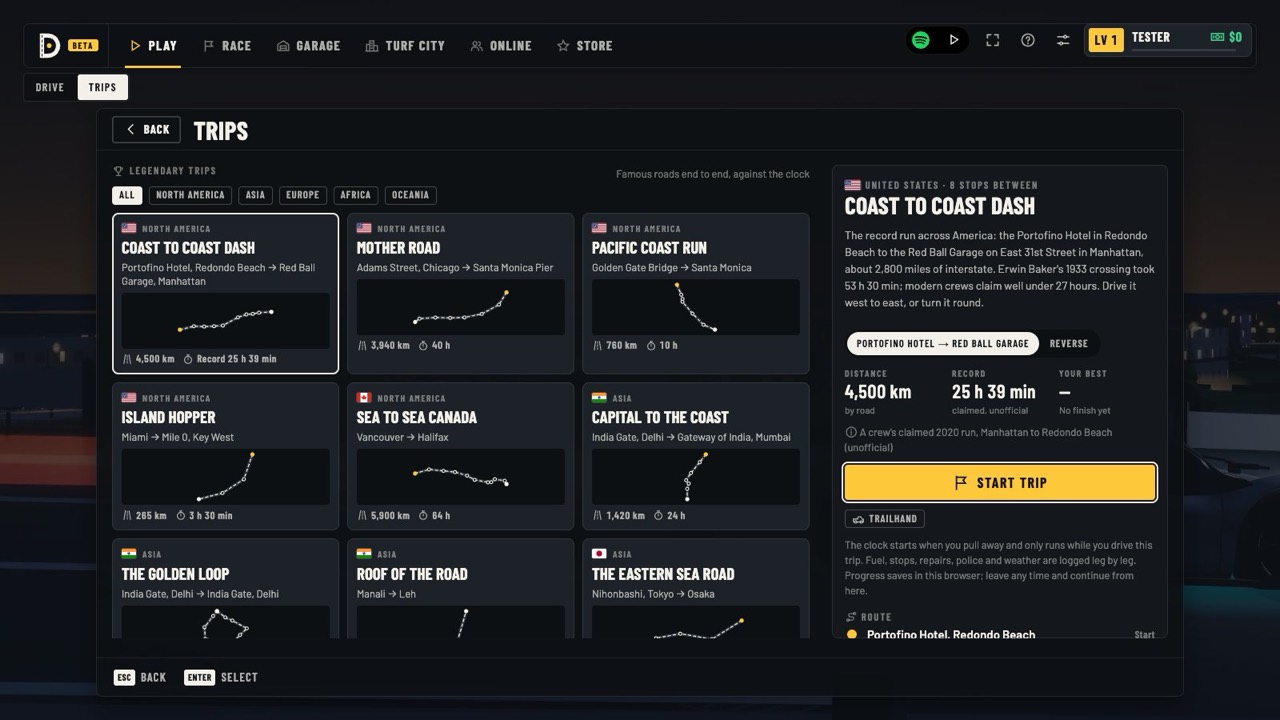
North America
Coast to Coast Dash
Los Angeles to New York: about 4,500 km, 10 stops, fastest claimed 25 h 39 min (unofficial).
Mother Road
Route 66 from Chicago to Santa Monica: about 3,940 km, 8 stops, about 40 h at the wheel.
Pacific Coast Run
Highway 1 from San Francisco to Santa Monica: about 760 km, 7 stops, about 10 h at the wheel.
Island Hopper
The Overseas Highway from Miami to Key West: about 265 km, 4 stops, about 3 h 30 min at the wheel.
Sea to Sea Canada
The Trans-Canada Highway from Vancouver to Halifax: about 5,900 km, 11 stops, about 64 h at the wheel.
Asia
Capital to the Coast
Delhi to Mumbai: about 1,420 km, 7 stops, about 24 h at the wheel.
The Golden Loop
The Golden Quadrilateral from Delhi: about 5,846 km, 13 stops, about 100 h at the wheel.
Roof of the Road
Manali to Leh: about 430 km, 3 stops, about 14 h at the wheel.
The Eastern Sea Road
The Tokaido from Tokyo to Osaka: about 515 km, 5 stops, about 7 h at the wheel.
Europe
Autobahn North
The Autobahn A9 from Munich to Berlin: about 585 km, 4 stops, about 6 h at the wheel.
The Ring Pilgrimage
Frankfurt to the Nürburgring: about 190 km, 3 stops, about 2 h at the wheel.
The Great North Road
The A1 from London to Edinburgh: about 660 km, 6 stops, about 8 h at the wheel.
Highland Loop
The North Coast 500 from Inverness: about 830 km, 7 stops, about 14 h at the wheel.
Fire and Ice Ring
Iceland's Ring Road from Reykjavík: about 1,332 km, 7 stops, about 17 h at the wheel.
Africa
Cape Coast Road
The Garden Route from Cape Town to Gqeberha: about 750 km, 6 stops, about 9 h at the wheel.
Oceania
Southern Ocean Drive
The Great Ocean Road from Torquay to Warrnambool: about 280 km, 5 stops, about 4 h at the wheel.
Down the Middle
The Stuart Highway from Darwin to Adelaide: about 3,020 km, 7 stops, about 32 h at the wheel.
How a trip works
- Start. Pick a trip on the Trips screen and press Start trip. It loads the start in the car you are driving now; change car in the garage first if you want.
- The clock starts when you pull away, so loading never counts, and it only runs while you drive this trip.
- Stops in order. The GPS leads you to each stop in turn. A town counts once you are within 1.2 km of its centre; exact spots such as a landmark need you closer.
- Leave any time. The run saves every few seconds. Continue trip, on the Trips screen or the Play hub, puts you back where you stopped.
- Finish at the last stop: the summary compares your time with the target and your best, leg by leg.
Reverse drives a trip the other way with its own best time. A teleport is allowed but marks the run assisted, which cannot set a best. Trips are saved in your browser, with no account, and pay nothing beyond what driving already earns. There are no online trip boards yet.
Make your own trip
New trip opens the editor: name it, then search a start, a finish and up to 12 stops in between (towns, addresses, landmarks, or a pasted "lat, lon"), and put them in order. The route outline and an estimated road distance update as you go. Edit or delete it later from the same screen.
The full details are in the player guide. For shorter, faster runs see famous roads and race tracks.